NoOps vs DevOps: Key Differences, Benefits, Tools, and How to Choose the Right Approach
Introduction
Modern software teams need to build and release products faster. They also need stable systems, strong security, and lower costs. DevOps helps teams meet these needs through teamwork and automation. NoOps takes automation further by reducing routine infrastructure work. It uses cloud services, automated tools, and managed platforms to handle many daily tasks. But NoOps does not mean that operations teams are no longer needed. People still guide systems, manage risks, and solve complex problems. Both approaches can improve software delivery, but they serve different needs. This guide explains NoOps vs DevOps in simple terms. It also covers their benefits, tools, challenges, and use cases.
What Is DevOps?
DevOps is a way for development and operations teams to work together. It helps teams plan, build, test, release, and manage software as one process. In older work models, developers often handed code to operations teams. This could cause delays and confusion. DevOps reduces these gaps through shared goals and better communication. Teams use automation to manage code testing, software releases, cloud setup, and system checks. They also track system health after each release. This helps them find problems early and fix them faster. DevOps does not depend on one tool. It depends on people, processes, and tools working together.
What Is NoOps?
NoOps means reducing routine operations work through automation and managed cloud services. It aims to let developers focus more on building software. Cloud platforms can handle tasks such as server setup, scaling, backups, and service updates. Automation tools can also manage deployments and infrastructure changes. This reduces the need for people to handle every small task. However, NoOps does not remove all operations work. Teams still need to manage security, access, costs, system design, and service reliability. They also need people who can handle unusual failures. NoOps is best seen as an automation-led operating model, not a world without IT teams.
NoOps vs DevOps: Main Differences
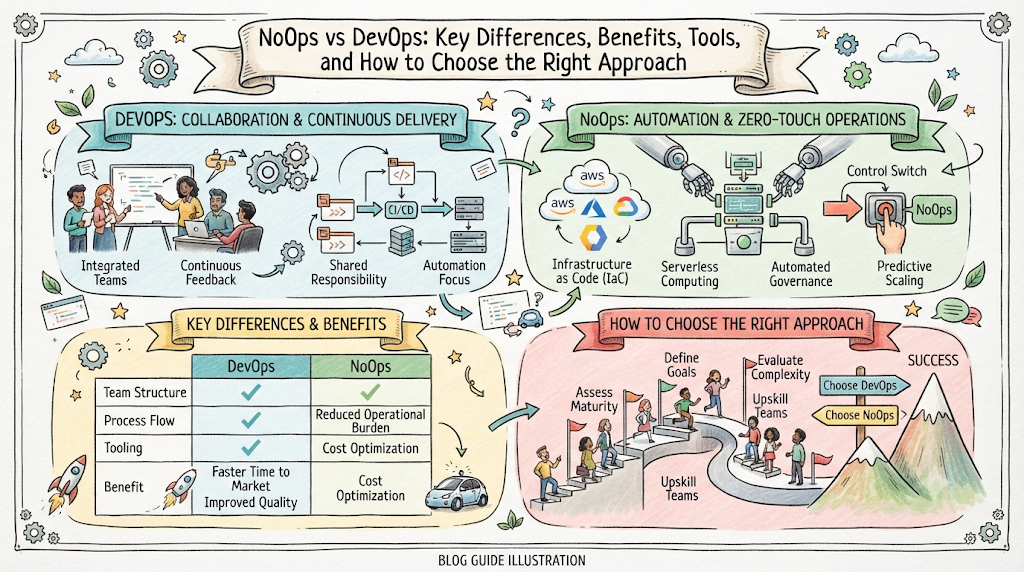
DevOps focuses on teamwork, shared ownership, and automated software delivery. NoOps focuses on reducing manual operations through cloud services and automation. Both approaches use automation, but their goals are not the same. DevOps builds a strong link between development and operations. NoOps tries to make many routine operations tasks happen without manual effort. The right choice depends on the product, team skills, system needs, and business goals.
| Comparison Area | DevOps | NoOps |
|---|---|---|
| Main goal | Improve teamwork and software delivery | Reduce routine operations work |
| Work model | Shared work between development and operations | More tasks handled by platforms and automation |
| Infrastructure | Often managed by internal teams | Often uses managed cloud services |
| Automation | Supports build, test, release, and operations | Automates more routine infrastructure tasks |
| Human role | Teams manage and improve systems | Teams guide, monitor, and govern automated systems |
| Best fit | Teams needing control and shared ownership | Teams with suitable cloud and managed services |
| Main challenge | Coordination and process changes | Vendor limits, governance, and hidden costs |
How DevOps Works
DevOps brings development and operations work into one shared process. Developers write code and store it in a shared repository. Automated tests check each change. A CI/CD pipeline then builds and prepares the software for release. Teams can deploy changes through approved steps. Monitoring tools track performance and errors after release. If a problem appears, teams use logs, alerts, and traces to find its cause. They then fix the issue and improve the process. This cycle helps teams release smaller changes more often. It also makes software delivery easier to track and improve.
How NoOps Works
NoOps uses managed platforms and automation to reduce routine work. A team may use a serverless platform instead of managing servers. It may use a managed database instead of setting up database machines. Infrastructure code can create cloud resources through approved templates. Automated policies can check access and security settings. Monitoring systems can alert teams when services fail. Some systems can also restart services or scale resources without manual action. Teams still need to define limits and review results. Good NoOps design gives automation clear rules and safe ways to handle failure.
Key Benefits of DevOps
DevOps helps teams improve the full software delivery process. It supports better teamwork and makes work easier to track. Developers and operations staff share responsibility for service quality. Automated tests can catch defects before release. CI/CD pipelines reduce repeated manual steps. Monitoring helps teams understand how software behaves in production. Teams can also use feedback from users and incidents to improve future releases. These practices help reduce delays and make releases more predictable. DevOps also supports a culture of learning. Teams can review failures without focusing only on blame.
Key Benefits of NoOps
NoOps can reduce the time spent on routine infrastructure tasks. Managed cloud services handle many tasks that once needed manual work. Developers can focus more on product features and customer needs. Automation can also make common processes more consistent. For example, a platform can apply the same deployment rules across several environments. Cloud services can scale resources based on demand. This can help teams respond to changing workloads. But these benefits depend on good design. Poor automation can spread mistakes across many systems. Teams must set clear rules, monitor services, and review costs.
Tools Used in DevOps and NoOps
Both approaches use tools for automation, delivery, monitoring, and cloud management. Some tools support both models. Others focus on specific tasks. The best toolset depends on the team’s needs and current systems. Teams should avoid adding tools without a clear reason. Too many tools can make work harder to manage.
| Tool or Platform | Main Use | Where It Helps |
|---|---|---|
| Jenkins | Build and release automation | DevOps and automated delivery |
| GitHub Actions | Workflow and CI/CD automation | Code testing and deployment |
| GitLab CI/CD | Build, test, and release pipelines | DevOps workflows |
| Docker | Package apps into containers | Consistent app environments |
| Kubernetes | Manage container workloads | Platform and deployment automation |
| Terraform | Create and manage infrastructure as code | Cloud resource automation |
| AWS Lambda | Run code without managing servers | NoOps-style serverless systems |
| Azure Functions | Run event-based code | Managed application workflows |
| Prometheus | Collect system metrics | Monitoring and alerting |
| Grafana | Display system and service data | Observability and operations |
When Should You Choose DevOps?
DevOps is a strong choice when teams need control over software delivery and infrastructure. It works well for products with complex systems or custom hosting needs. It also suits teams that need close links between developers and operations staff. DevOps helps when teams want to improve release speed without giving up control. It can support both cloud and on-premises systems. Teams can start with source control, automated tests, and a simple pipeline. They can then improve monitoring, security checks, and deployment methods over time.
When Should You Choose NoOps?
NoOps can suit teams that use cloud services and want less routine infrastructure work. It can work well for new applications, event-based systems, and workloads with changing demand. Managed databases, serverless platforms, and cloud automation can reduce daily maintenance. Small teams may benefit when they lack staff for every infrastructure task. Still, teams must check service limits, costs, security needs, and vendor risks. NoOps may not suit systems that need deep control over hardware or platform behavior. It is also not a good fit when teams lack the skills to govern automation.
Practical Examples of DevOps and NoOps
Consider an online shopping platform. A DevOps team may use a CI/CD pipeline to test and release new checkout features. Developers and operations staff review errors and improve the service together. The team may also manage its own Kubernetes clusters and monitoring setup. A NoOps-style approach may use managed databases, serverless functions, and automatic scaling. The cloud provider handles many routine platform tasks. The team still manages application logic, access rules, service limits, and costs. Both approaches can support the same business. The main difference is how much routine infrastructure work the team manages itself.
A second example is a business reporting application. A DevOps team may maintain its deployment pipeline and hosting environment. It can add tests before each release and monitor application performance. A NoOps-style design may use a managed data service and scheduled cloud functions. These services can process reports without a team managing every server. The business still needs to check data quality, access, and service reliability.
Challenges of DevOps
DevOps needs more than new tools. Teams must change how they share work and make decisions. Developers and operations staff may have different goals at first. Old systems can also make automation difficult. Poor tests can allow defects into production. Weak monitoring can hide problems until users report them. Teams may also build complex pipelines that few people understand. To avoid these issues, start with clear goals. Improve one part of the delivery process at a time. Keep pipeline steps easy to review. Give teams shared responsibility for service quality.
Challenges of NoOps
NoOps can reduce routine work, but it also creates new risks. Teams may depend too much on one cloud provider. Managed services can have limits that affect application design. Cloud bills can grow when teams do not track resource use. Automation can also repeat a bad change across many services. Security settings may become unsafe if teams do not review them. To manage these risks, set clear policies and access rules. Track cloud costs and service health. Keep backup and recovery plans ready. Make sure people can take control when automation fails.
Can DevOps and NoOps Work Together?
Yes. DevOps and NoOps can work together in one organization. A team can use DevOps practices to manage code, testing, releases, and feedback. It can also use managed cloud services to reduce routine infrastructure tasks. For example, a team may run automated tests and deployments while using a managed database. It may use infrastructure as code to set up cloud resources. It can also use serverless services for selected workloads. This combined approach gives teams more choice. They can automate suitable tasks while keeping control of important systems. The goal is not to follow a label. The goal is to build a safe and reliable way to deliver software.
Skills Needed for DevOps and NoOps
DevOps professionals need skills in source control, scripting, CI/CD, containers, cloud platforms, and monitoring. They should understand how applications move from code to production. They also need communication and problem-solving skills. NoOps professionals need many of these skills too. They also need a strong understanding of managed cloud services, automation, security policies, and cost control. Both paths benefit from knowledge of Terraform, Kubernetes, GitOps, and observability. The exact skills depend on the role and platform. Training and hands-on labs can help people build practical knowledge. Learners can explore relevant resources and courses through NoOpsSchool.
How to Move from DevOps Toward NoOps
A move toward NoOps should happen step by step. Teams should first review their current systems and daily tasks. They can then find work that is safe to automate or move to managed services. Start with low-risk tasks, such as scheduled jobs or basic resource setup. Test each change before using it in production. Keep clear records of access, costs, and service limits. Teams should also train staff to manage cloud services and automation. Do not move every workload at once. Some systems may still need custom infrastructure or direct control. A gradual plan helps teams learn and reduce risk.
Conclusion
DevOps and NoOps both aim to improve software delivery, but they take different paths. DevOps builds shared ownership between development and operations teams. NoOps uses managed services and automation to reduce routine operations work. Neither approach removes the need for skilled people. Teams still need to manage security, costs, reliability, and system design. Many organizations can combine both models. They can use DevOps practices while moving suitable tasks to managed platforms. The best approach depends on business needs, technical limits, and team skills. Start with clear goals, automate carefully, and keep improving.
Frequently Asked Questions
What is the main difference between NoOps and DevOps?
DevOps brings development and operations teams together. It uses automation to improve software delivery. NoOps focuses on reducing routine operations work through managed services and automation. Both models still need skilled people. The main difference is how teams manage infrastructure and daily operations tasks.
Does NoOps mean there are no operations engineers?
No. NoOps does not remove the need for operations skills. People still manage security, reliability, access, costs, and system design. They also handle complex failures and review automated processes. The model reduces routine work. It does not remove human responsibility.
Is NoOps better than DevOps?
NoOps is not always better than DevOps. Each model fits different needs. DevOps works well when teams need control and shared ownership. NoOps can help when managed cloud services can handle routine tasks. Teams should choose based on their systems, skills, risks, and goals.
Can a company use both DevOps and NoOps?
Yes. A company can use DevOps practices for testing, releases, and teamwork. It can also use managed services to reduce infrastructure work. This lets teams keep control of important tasks while automating routine work. A mixed approach can fit many modern cloud environments.
Which tools are useful for DevOps?
Common DevOps tools include Jenkins, GitHub Actions, GitLab CI/CD, Docker, Kubernetes, Terraform, Prometheus, and Grafana. Each tool supports a different part of the process. Teams should choose tools based on their needs. A simple, well-managed toolset is often better than a large one.
Which cloud services support NoOps?
Managed databases, serverless platforms, cloud storage, and managed container services can support NoOps practices. Examples include AWS Lambda and Azure Functions. These services reduce the need to manage some infrastructure tasks. Teams must still review service limits, costs, security, and reliability.
Does NoOps reduce cloud costs?
It can, but lower costs are not guaranteed. Managed services may reduce staff time and maintenance work. However, poor resource choices and high usage can increase cloud bills. Teams should track spending, set budgets, and review resource use. Cost control remains important in every operating model.
Is NoOps suitable for small businesses?
It can be suitable for small businesses that use managed cloud services. These services can reduce the need to manage servers and databases. But businesses must still plan for security, backups, costs, and service failures. The best choice depends on workload needs and staff skills.
What skills should I learn for NoOps?
Start with cloud basics, scripting, automation, security, and monitoring. Learn how managed services work and how to control cloud costs. Terraform, GitOps, Kubernetes, and serverless platforms can also help. Hands-on practice is important because real systems have limits and risks.
How can I start learning NoOps?
Begin by learning cloud computing and basic automation. Build a small application with a managed database or serverless function. Add monitoring, access controls, and cost alerts. Then learn how to manage infrastructure through code. Practical training and guided labs can help you build these skills.
Leave a Reply