Explore the Best Events Across the USA: Discover Activities, Compare Tickets, and Make Plans
Introduction
From exciting concerts to useful business conferences, the United States offers events for every interest. You can enjoy a music show, join a cooking class, attend a sports event, or meet industry experts. Every city brings fresh opportunities throughout the year.
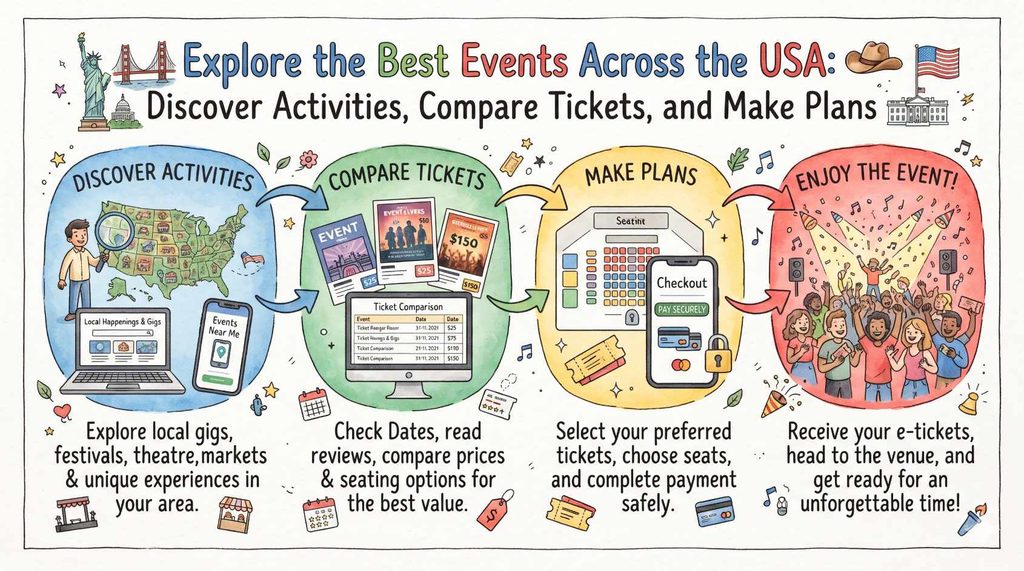
Finding the right event can take time without a clear plan. You need accurate dates, useful descriptions, suitable locations, and transparent ticket prices. Online event platforms make this process easier. They help people discover activities and help organizers reach interested audiences. myeventsnow.us/ offers an online space where people can explore event opportunities across the USA.
What Makes the US Event Scene So Diverse?
The American event scene includes entertainment, education, business, culture, and community activities. Large cities host major festivals and conferences. Smaller towns also offer local gatherings and seasonal celebrations.
Here are some popular event categories to explore.
Concerts and Music Festivals
Music fans can choose from many live performances. Options include pop concerts, rock shows, jazz nights, country music events, and classical performances.
Large music festivals often feature several artists. Smaller venues may offer local bands and independent performers.
Check the artist lineup, venue, and schedule before booking. Also, review ticket rules and entry conditions.
Food Festivals and Cultural Events
Food festivals bring local dishes and cooking traditions together. Visitors can explore regional flavors, street food, and special menus.
Cultural events may include dance shows, art displays, traditional music, and holiday celebrations. These gatherings offer a closer look at local communities.
Conferences and Business Events
Professional events help people learn and build useful connections. They cover topics such as technology, finance, healthcare, marketing, and leadership.
A conference may include expert talks, panel discussions, workshops, and networking sessions. Review the agenda before choosing a pass.
Educational Workshops and Training
Workshops focus on practical learning. People can explore photography, programming, cooking, writing, design, and many other subjects.
Some sessions welcome beginners. Others suit people with existing knowledge. Check the course description before registering.
Sports and Fitness Activities
Sports fans can explore tournaments, races, competitions, and live matches. Fitness enthusiasts may prefer yoga sessions, cycling events, running clubs, and outdoor challenges.
Check participant requirements and safety instructions before joining an activity.
Build a Better Event Search Strategy
A clear search saves time and helps you compare relevant options. Start by deciding what kind of experience you want.
Use these steps to guide your search:
- Choose your interest: Pick entertainment, education, sports, culture, or business.
- Select a location: Search within your city or preferred travel area.
- Set your dates: Choose a suitable day or weekend.
- Decide your budget: Include admission, transport, parking, and other costs.
- Check event details: Read the schedule, description, and entry rules.
- Compare options: Review several events before making a decision.
You can also save interesting listings while planning. This makes it easier to compare choices later.
Discover Events in Major US Cities
Different American cities attract different types of events. Some focus on entertainment, while others host major business and cultural gatherings.
| City | Popular Event Interests |
|---|---|
| New York City | Broadway shows, concerts, art exhibitions, and business events |
| Los Angeles | Film festivals, music shows, comedy, and creative workshops |
| Chicago | Food festivals, theatre, sports, and live music |
| Miami | Cultural celebrations, beach events, art shows, and nightlife |
| Austin | Music festivals, technology meetups, and community events |
| Boston | Educational programs, academic conferences, and history events |
| Seattle | Technology gatherings, outdoor activities, and concerts |
| Nashville | Country music, live performances, and food festivals |
| Las Vegas | Entertainment shows, trade fairs, and conventions |
| San Francisco | Startup events, technology conferences, and cultural activities |
These cities offer many choices throughout the year. Check current event listings for schedules and booking information.
Find Events Near You With Simple Searches
Local activities often make great weekend plans. You may want a family outing, a live performance, or a nearby workshop.
Use location-based searches to find suitable options. Combine your city with an event type and date.
For example:
- Family activities in Dallas this weekend
- Upcoming concerts in Los Angeles
- Food festivals in New York
- Art workshops in Portland
- Business conferences in Chicago
- Outdoor fitness events in Denver
- Local comedy shows in Austin
Read the venue details carefully. A nearby event may still require extra travel time because of traffic or parking.
A Simple Guide to Online Event Ticket Booking
Online ticket booking helps attendees plan ahead. It also gives them time to compare prices and admission options.
Follow this process when buying tickets:
Search for an event: Use its name, category, city, or date.
Read the listing: Check the description, schedule, and venue.
Review admission options: Compare general, VIP, group, and discounted tickets.
Check the total price: Look for service fees and other charges.
Read the conditions: Understand refund rules and entry requirements.
Enter your details: Provide the information required for booking.
Complete payment: Follow the platform’s checkout instructions.
Save your confirmation: Keep your ticket and booking details accessible.
Check your email before leaving for the venue. Organizers may share schedule changes or important instructions.
Understand Different Event Ticket Categories
Ticket prices and benefits can vary from one event to another. Compare each option before choosing.
| Ticket Category | What It Usually Offers | Best For |
|---|---|---|
| General Admission | Standard entry | Regular attendees |
| VIP Admission | Premium access or extra benefits | Guests seeking added comfort |
| Early Bird | Lower price during an early sales period | Advance planners |
| Group Admission | Tickets for several people | Friends and families |
| Student Admission | Discounted entry for eligible students | Qualified students |
| Workshop Pass | Entry to selected learning sessions | Workshop participants |
Some events offer several ticket levels. Others provide only one admission option. Always check the exact benefits listed by the organizer.
Why Event Ticketing Platforms Matter
An event ticketing platform connects ticket sales with event information. It gives organizers a way to manage bookings and helps attendees purchase admission online.
A useful platform should support:
- Clear event descriptions
- Simple ticket selection
- Transparent pricing
- Secure payment options
- Booking confirmations
- Ticket availability updates
- Attendee records
- Mobile-friendly pages
- Helpful customer support
Organizers should also compare transaction charges and payout schedules. These details affect their total event costs.
Event Registration Software for Organizers
Registration software helps event teams collect attendee details. It also supports guest management before an event begins.
For example, a conference may ask guests for their names, company details, and session choices. A training workshop may collect experience levels and contact information.
Useful features include:
- Custom registration forms
- Guest lists
- Confirmation emails
- Registration limits
- Attendee categories
- Check-in tools
- Data exports
- Registration reports
Keep registration forms short and clear. Ask only for information that supports the event.
Publish an Event Listing That People Understand
A strong event listing answers common questions before visitors contact the organizer. It should explain the experience in simple language.
Use this checklist when publishing an event:
- Write a clear title: Tell visitors what the event offers.
- Explain the experience: Describe activities, speakers, or performances.
- Add the schedule: Include the date, start time, and duration.
- Confirm the venue: Share the correct location and address.
- Select a category: Choose topics that match the event.
- Set ticket prices: Explain available admission options.
- Add registration details: Tell visitors how to book or sign up.
- Share contact information: Provide a useful way to ask questions.
- Review the listing: Check every detail before publishing.
Use accurate information throughout the listing. Clear details help visitors decide whether the event suits them.
Improve Online Ticket Sales With Better Planning
Online ticket sales need a simple buying process and clear communication. Organizers should explain the event’s value before asking people to purchase tickets.
These practices can help:
Create an informative event page. Explain the main activities and benefits.
Offer suitable ticket options. Consider early bird, group, and standard admission.
Display all charges. Show service fees before checkout.
Share the event widely. Use relevant social channels, email, and community groups.
Set clear sales periods. Explain when ticket sales begin and end.
Send booking updates. Confirm purchases and share important announcements.
Track ticket activity. Review registrations and sales during the campaign.
Organizers should also explain refund and cancellation policies. Clear rules help attendees understand their options.
How Event Management Software Supports Planning
An event involves many tasks beyond ticket sales. Teams need to coordinate schedules, people, venues, and communication.
Event management software can help organize these activities.
| Event Task | How Software Can Help |
|---|---|
| Scheduling | Organize sessions and event timings |
| Attendee Management | Maintain guest information |
| Ticket Management | Review ticket categories and sales |
| Communication | Share updates with registered guests |
| Staff Coordination | Assign duties to team members |
| Speaker Management | Store speaker details and session information |
| Attendance | Support check-in and guest tracking |
| Reporting | Review registrations and event results |
A small workshop may need only basic tools. A large conference may require several management features.
Choose a system that matches your event size. Avoid paying for features your team will not use.
How MyEventsNow USA Helps People Explore Events
Attendees want event information that makes planning simple. Organizers want a practical way to share their activities with interested people.
MyEventsNow USA supports this connection through an online event discovery platform. Visitors can explore event opportunities and review details before making plans. Organizers can present their events to people looking for new experiences.
A useful listing should clearly explain the event, date, location, ticket options, and registration process.
This information helps visitors compare activities. It also gives organizers a better way to present their plans.
Practical Examples of Online Event Discovery
People use event platforms for different needs. The following examples show how a clear search can support their plans.
A Couple Planning a Weekend in Miami
A couple wants to explore something different on Saturday. They search for live music, food festivals, and cultural activities.
They compare locations, schedules, and admission prices. Then they choose an event that fits their plans.
A Marketing Professional Attending a Conference
A marketing professional in New York wants to learn about new industry trends. They search for upcoming marketing conferences.
They review the agenda, speakers, and session topics. After comparing ticket options, they select a suitable pass.
A Local Business Hosting a Workshop
A small business plans a weekend photography workshop. The team needs to attract participants and collect registrations.
They prepare an event description, add the schedule, and explain the fees. They also share the listing with relevant local communities.
A Student Searching for Learning Opportunities
A student in Boston wants to improve their coding skills. They look for beginner-friendly training sessions.
They compare course topics, session times, and prices. They choose a workshop that matches their current knowledge.
What Should You Compare Before Selecting an Event Platform?
A platform should support your main goals. Attendees need easy discovery and booking. Organizers need useful tools for publishing and managing events.
Review these points before choosing a service:
| Feature | Questions to Ask |
|---|---|
| Search Options | Can visitors filter by date, location, and category? |
| Event Listings | Can organizers share complete event information? |
| Ticket Sales | Does the platform support different ticket types? |
| Registration | Can teams collect attendee information? |
| Payment | Are payment options and charges clear? |
| Communication | Can organizers send updates to attendees? |
| Reporting | Can teams review sales and registrations? |
| Mobile Experience | Can visitors use the platform on phones? |
| Customer Support | Can users find help when problems arise? |
Compare the platform’s costs with its features. A simple service may work well for small events, while larger programs may need advanced tools.
Event Planning Mistakes That Can Cause Problems
Good planning starts with attention to detail. Avoid these common mistakes when searching for or organizing events.
- Ignoring the event date: Confirm the full date before booking.
- Checking only the ticket price: Include extra fees in your budget.
- Missing the venue address: Review the location before travelling.
- Skipping event descriptions: Understand what the ticket includes.
- Ignoring entry conditions: Check age limits and other restrictions.
- Waiting until the last minute: Popular events may have limited tickets.
- Overlooking refund rules: Read the cancellation policy first.
- Entering incorrect details: Review attendee information before payment.
- Forgetting confirmation emails: Save your ticket and booking number.
- Ignoring schedule updates: Check messages from the organizer.
- Missing accessibility information: Review available facilities when needed.
- Choosing an unsuitable platform: Compare features before making a decision.
A few minutes of checking can prevent many booking problems.
Frequently Asked Questions
1. How do I find upcoming events across the USA?
You can search online event platforms, city calendars, venue websites, and community pages. Start with your preferred city and event category. Then review dates, locations, ticket prices, and descriptions. Compare several listings before choosing an activity that matches your schedule and interests.
2. Where can I discover local events near me?
Use your city, neighborhood, or ZIP code in your search. Add terms such as concerts, festivals, workshops, or sports. Review the venue address and travel distance before making plans. Local event listings can help you find activities that suit your free time.
3. Is online event ticket booking safe?
Online booking can offer a convenient way to purchase event admission. Choose a reliable platform and review its payment process. Check the event details, final price, and refund rules before paying. Save your confirmation and use the official ticket information when you arrive.
4. What types of events can I find in the United States?
The USA offers concerts, music festivals, food fairs, conferences, workshops, sports events, exhibitions, and community gatherings. You can also find comedy shows, theatre performances, and cultural celebrations. Search by category and location to explore activities that match your interests.
5. How do event ticketing platforms work?
Event ticketing platforms help organizers list events and sell admission online. Visitors can review event information, compare ticket options, and complete bookings. Organizers can track ticket sales and manage booking records. Some platforms also support attendee communication and event reports.
6. What is event registration software?
Event registration software helps organizers collect and manage attendee information. It may include registration forms, confirmation emails, guest lists, and check-in features. Teams use these tools to organize participants and reduce manual work. The right features depend on the event’s size and requirements.
7. How can I promote an event online?
Create a clear listing with a useful title, description, date, venue, and ticket details. Share it through relevant social media pages, email campaigns, and community groups. Explain why people should attend. Keep the information accurate and share updates when plans change.
8. Can small businesses use online event platforms?
Yes. Small businesses can promote workshops, product launches, networking sessions, and local celebrations. A detailed listing helps people understand the activity and its value. Organizers can also use registration and ticketing features to manage guests and track interest.
9. What should I check before booking an event?
Confirm the event date, time, venue, ticket category, and total price. Read the description and review any age or entry requirements. Check refund conditions and accessibility details when relevant. Save your confirmation after payment so you can access your booking information easily.
10. What is the difference between event management and ticketing software?
Ticketing software focuses mainly on ticket sales and booking tasks. Event management software can support wider planning needs. These may include schedules, attendee records, staff duties, communication, and reporting. Some services combine both functions, while others focus on one area.
11. How can event organizers sell more tickets?
Organizers can improve ticket sales with clear listings, suitable pricing, and simple checkout steps. They should explain event benefits and share information with relevant audiences. Early bird offers and group tickets may also attract interest. Regular updates help people stay informed before the event.
12. Why should I compare online event platforms?
Platforms differ in pricing, features, payment options, and support. Compare event discovery, ticket booking, registration, reporting, and mobile access. Organizers should also review service fees and payout terms. Careful comparison helps users select a platform that meets their actual needs.
Plan Your Next Experience With Confidence
Every event offers a chance to learn, connect, or enjoy something new. The best choice depends on your interests, budget, location, and available time. Start with a clear search and review each listing carefully. Compare admission options before completing your booking.
Organizers can also improve their results with accurate descriptions and simple registration. Clear communication helps visitors understand what to expect. Online discovery tools make it easier to connect people with activities across the country. Explore MyEventsNow USA to discover event opportunities and take the next step toward your plans.
Leave a Reply