Proezi Connects Visitor Guidance, Payments, and Business Identity Through Simple Digital Pages
Introduction
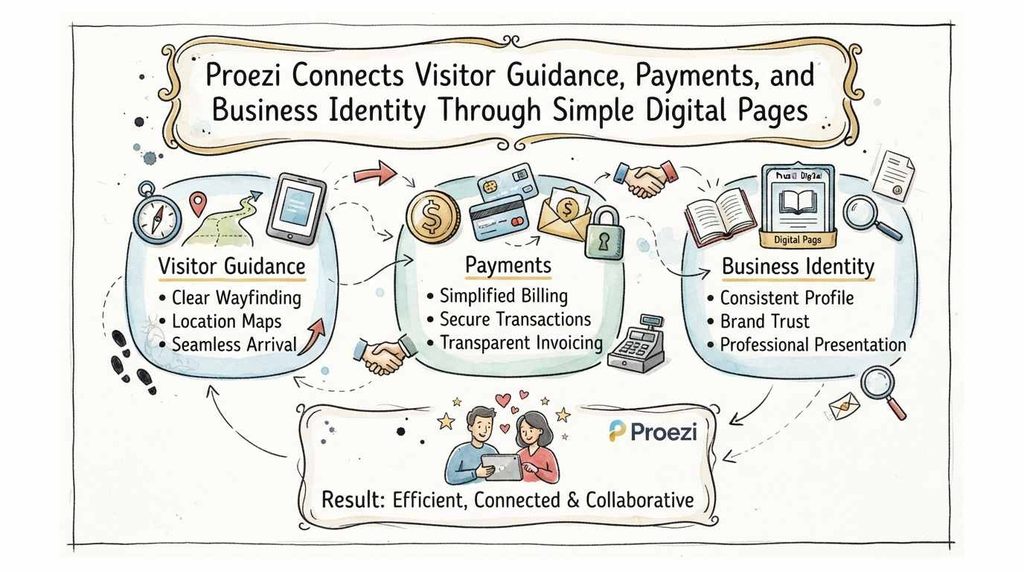
People interact with businesses in many ways. They visit offices, attend events, make payments, and request company details. Yet, finding the right information can take more time than expected. A visitor may reach the correct street but miss the entrance. A customer may need bank details before making a transfer. A supplier may ask for official business information before starting work. These small communication gaps can create delays and repeated questions. Businesses can make these tasks easier by sharing clear, organized information online. This is where Proezi offers a practical approach. It helps organizations create shareable pages, links, and QR codes for visitor directions, payment instructions, and business identity details.
What Is Proezi?
Proezi is a web-based platform that helps businesses share useful information through dedicated digital pages. Organizations can create visitor arrival pages, payment information pages, and business identity pages. Each page can have its own link and QR code. People can open shared pages in a browser without installing an app or creating an account. This makes information easier to access for visitors, customers, suppliers, and business partners. Instead of sending long messages or repeating the same details, a business can share one page whenever someone needs the information.
Why Businesses Need Better Digital Information Sharing
Businesses often share the same details many times. Reception teams explain entrance locations, finance teams send payment instructions, and administrative staff answer company identity questions. This repeated work takes time and creates room for confusion. Old messages may contain outdated information. Different employees may also share different instructions. A central page gives teams a consistent reference. They can update the information when something changes and share the latest version through the same link or QR code. This simple method can improve everyday communication without adding complicated steps.
QR Code Directions for Visitors: Making Business Locations Easier to Find
A street address does not always show someone where to enter a building. Large campuses, office parks, hospitals, hotels, and event spaces often have several gates or entrances. QR code directions for visitors can solve this problem by connecting people to useful arrival details. A business can place a QR code on invitations, confirmation messages, signs, or websites. Visitors scan it to see parking areas, entrance points, reception locations, and other helpful instructions. They can check the details before leaving home or after reaching the surrounding area. This approach reduces the need for repeated phone calls and directions from staff.
Understanding Visitor Wayfinding Software
Visitor wayfinding software helps people move through unfamiliar locations. It can support directions from nearby roads to specific buildings, entrances, floors, and rooms. However, not every business needs a complex indoor navigation system. Some locations mainly need clear instructions, useful photos, and simple route guidance. A digital page can provide these details in an easy format. Businesses should consider their layout, visitor volume, accessibility needs, and daily operations before choosing a solution. The right approach should help people reach their destination without creating extra work for employees.
Digital Visitor Arrival Instructions: From Road to Reception
Digital visitor arrival instructions explain what happens after someone approaches a business location. They can include the main road, nearby landmarks, parking arrangements, gates, reception desks, elevators, and room numbers. Photos and visual markers can make unfamiliar places easier to understand. Businesses can also add temporary notices when construction, security checks, or entrance changes affect normal routes. A visitor can follow outdoor navigation through a preferred map app and then use the shared instructions for the final approach. This gives people a clearer path from the nearby road to the correct destination.
How to Find Us Page for Business: What Should It Include?
A useful how to find us page for business should answer the questions visitors usually ask before arriving. It should explain the exact entrance, parking options, reception location, and any special access rules. Nearby landmarks can help people recognize the area. Clear photos can show gates, building signs, and walking paths. Businesses with large premises should explain how to reach individual departments or rooms. The page should also include a contact option for visitors who need help. Most importantly, the instructions should use simple words and follow the actual route that a first-time visitor will take.
Event Venue Directions QR Code: Simplifying Event Arrivals
Event organizers often manage guests who have never visited the venue. A building may have separate entrances for attendees, speakers, staff, and suppliers. An event venue directions QR code can bring important arrival information together. Organizers can share it through registration emails, digital tickets, event websites, and printed signs. The page can explain the correct gate, parking area, check-in desk, hall, and accessibility route. If the venue changes an entrance or parking arrangement, organizers can update the shared page. Guests can then use the same QR code instead of searching through old messages for new instructions.
Parking and Entrance Directions for Visitors
Parking and entrance directions for visitors should remove uncertainty before someone reaches the building. Businesses should explain where visitors can park, which gate they should use, and whether they need to show identification. They should also mention any walking distance between the parking area and reception. Separate instructions may help pedestrians, drivers, delivery teams, and people who need step-free access. Photos of the correct entrance can prevent visitors from choosing a staff-only or delivery gate. When parking arrangements change, businesses should update the shared information quickly.
Last Mile Navigation for Businesses: Solving the Final-Destination Problem
Last mile navigation for businesses focuses on the final part of a journey. A map may guide someone to the correct street, but it may not identify a building entrance or a particular office. This gap is common in business parks, hospitals, campuses, hotels, and large event venues. Visitors may reach the location but still need help finding the right place. Clear arrival pages can explain the remaining steps through photos, landmarks, written directions, and location details. This makes the journey more complete by connecting outdoor navigation with practical on-site guidance.
How QR Codes Make Visitor Communication More Practical
QR codes give businesses a simple way to share information across different channels. Teams can add them to reception signs, appointment messages, visitor passes, event invitations, and printed instructions. Visitors only need a compatible phone camera or QR scanner to open the linked page. They do not need to search for a document or install a separate application. Businesses can also reuse the same code when the information remains relevant. This reduces the need to print new instructions every time a minor detail changes. A clear page and a visible QR code can make visitor communication easier to manage.
How to Share Bank Details with Customers Securely
Businesses often need to share account information with customers, suppliers, and partners. To share bank details with customers, they should provide clear payment instructions through a reliable communication process. The details may include the account holder’s name, bank name, account number, routing information, and payment reference. Teams should check every detail before sharing it. They should also explain which payment method the customer should use and what reference to include. Proezi can present payment instructions on a dedicated page, but businesses must still protect their financial information and verify payment details through their own internal process. The platform does not process or transfer money.
UPI QR Code Payment Page: Making Payment Instructions Easier to Access
A UPI QR code payment page can help customers find payment instructions without searching through old messages. A business can share its UPI information and related payment details on one page. Customers can open the page and use their preferred payment application to complete a transaction. The business should clearly state the correct payment reference and any instructions that customers must follow. Staff should also explain how customers can contact the business if they have questions. Proezi provides a way to share payment information, but the actual payment takes place through the customer’s banking or payment application.
Share Business Registration Details Online
Customers and suppliers sometimes need to confirm basic company information before working with a business. Organizations can share business registration details online through a dedicated identity page. This page may include the registered business name, company registration identifiers, and relevant tax numbers. Keeping these details together makes them easier to find and share. It can also reduce repeated requests for the same information. However, businesses should understand the difference between displaying information and officially verifying it. Format or checksum validation does not prove ownership or confirm registration with a government authority.
Why Businesses Need Separate Visitor, Payment, and Identity Pages
Visitor directions, payment details, and business identity information serve different purposes. Combining them into one long document can make important details harder to find. Separate pages allow each audience to reach the information they need. A visitor can open arrival instructions, while a customer can view payment details. A supplier can access the business identity page. This separation also helps teams manage updates without changing unrelated information. The following table shows how each page supports a different business need.
| Page Type | Main Purpose | Typical Information | Intended Audience |
|---|---|---|---|
| Visitor directions page | Help people reach a location | Parking, entrances, gates, reception, floors | Visitors and delivery partners |
| Payment details page | Share payment instructions | Bank details, UPI information, payment references | Customers and suppliers |
| Business identity page | Share company information | Registered name, registration numbers, tax identifiers | Customers and business partners |
How Proezi Helps Offices, Clinics, Hotels, and Event Venues
Different businesses face different information-sharing problems. Offices may need to explain building access, visitor registration, and department locations. Clinics can guide patients toward the correct entrance, reception desk, and appointment area. Hotels may share directions for parking, check-in, and guest facilities. Event venues can help attendees find gates, halls, and registration points. Organizations can create separate pages for different locations and audiences. This approach is useful for businesses that want to make everyday instructions easier to access without asking every visitor to install an app.
How to Create Better Digital Arrival Instructions
Good arrival instructions begin with the questions a first-time visitor may ask. Businesses should walk through the actual route and note every point where someone could become confused. They should then write clear directions and add photos where useful. Teams should test the page with someone who does not know the location. That person can reveal missing steps or unclear descriptions. Businesses should also review the instructions after changing entrances, parking arrangements, or building access rules. A short review process helps keep the information useful.
A practical setup can follow these steps:
- Identify the main visitor types.
- Walk through each arrival route.
- Record parking and entrance details.
- Add useful photos and landmarks.
- Explain reception and internal directions.
- Include accessibility information.
- Add a contact option for assistance.
- Test the instructions with a first-time visitor.
- Create a shareable link and QR code.
- Review the page whenever the location changes.
Multilingual and Accessible Visitor Directions
Visitors may speak different languages or have different access needs. A business should use simple wording and avoid unclear local expressions. Photos, arrows, and familiar landmarks can help people understand directions more easily. Step-free routes and accessible entrances should be clearly identified. Businesses that welcome international guests may also provide instructions in more than one language. Offline-ready information can help visitors who have already opened or cached a page before losing their connection. These small improvements can make arrival information easier for more people to use.
How to Keep Shared Business Information Accurate
Shared pages only help when their information stays current. A business should assign responsibility for reviewing each page. Reception teams can check visitor instructions, finance teams can review payment details, and administrative teams can maintain company identity information. Updates should happen whenever an entrance, bank account, or company detail changes. Staff should also check printed QR codes and signs after updating a page. A regular review can catch outdated details before they cause confusion. Businesses should use their own verification procedures for sensitive payment and registration information.
A Practical Digital Information-Sharing Checklist for Businesses
Before sharing a digital page, a business should check whether the content is complete, clear, and suitable for its audience. The following checklist can help teams review their information before publishing it.
- Confirm that every detail is correct.
- Use a clear page title.
- Write short and direct instructions.
- Add photos when they improve understanding.
- Check that links and QR codes open correctly.
- Explain any special access requirements.
- Remove outdated notices and instructions.
- Review payment information through internal checks.
- Confirm business identifiers against official records.
- Assign a person to manage future updates.
AEO, GEO, LLMO, AISEO, and E-E-A-T for Business Information Content
People now discover businesses through search engines, maps, AI assistants, and conversational search tools. Clear and well-organized information can help these systems understand what a business offers and where it operates. AEO focuses on useful answers, while GEO and LLMO focus on how content appears in generative and large language model experiences. AISEO covers content planning for AI-supported search. E-E-A-T encourages clear expertise, experience, authority, and trust signals. Businesses should publish accurate service details, consistent company information, useful location instructions, and direct answers to common questions. They should avoid unsupported claims and keep important details updated. These practices help both people and search systems understand the information more clearly.
Why Proezi Is Worth Exploring
Businesses do not always need a complicated system to solve everyday communication problems. Sometimes they need a clear way to share directions, payment instructions, and company details. Proezi brings these needs into separate digital pages with shareable links and QR codes. Visitors and customers can open the information through a browser without creating an account or installing an app. Organizations can use the pages for offices, clinics, hotels, events, and other business locations. The platform does not replace maps, banking applications, or official registration checks. Instead, it gives businesses a practical way to organize and share the information people need.
Frequently Asked Questions
1. How can businesses create QR code directions for visitors?
Businesses can prepare a digital arrival page with parking details, entrances, landmarks, and reception instructions. They can then share its QR code through signs, emails, websites, or visitor messages.
2. What should visitor wayfinding software include?
Useful visitor wayfinding software should provide clear routes, entrance details, photos, landmarks, accessibility information, and directions to important areas inside a location.
3. What are digital visitor arrival instructions?
Digital visitor arrival instructions explain how people can travel from nearby roads to the correct entrance, reception desk, floor, or room. They can include written steps, photos, and temporary notices.
4. What should a how to find us page for business contain?
It should include the business address, parking details, entrance instructions, nearby landmarks, reception location, accessibility details, and a contact option for visitors.
5. How does an event venue directions QR code help attendees?
It gives attendees quick access to venue entrances, parking areas, registration desks, and event halls. Organizers can update the shared page when arrangements change.
6. Why are parking and entrance directions for visitors important?
Clear directions help visitors avoid the wrong gate, parking area, or building entrance. They can also reduce calls to reception and delays at busy locations.
7. What does last mile navigation for businesses mean?
It means helping people complete the final part of their journey after reaching the nearby area. This includes finding the correct building, gate, entrance, or room.
8. How can a business share bank details with customers?
A business can provide account information and payment instructions through a dedicated digital page. Customers should still verify the details before making a transfer.
9. What is a UPI QR code payment page?
It is a page that displays UPI payment information and related instructions. Customers can use their preferred payment application to complete the transaction.
10. Can businesses share business registration details online?
Yes. Businesses can create a page containing registered names, registration identifiers, and tax details. Displaying these details does not replace official government verification.
Final Thoughts
Business information becomes more useful when people can find it at the right moment. Visitors need clear arrival instructions. Customers need understandable payment details. Suppliers and partners may need basic company information. Separate digital pages can make these tasks easier to manage and share. Proezi brings these information types together through simple links and QR codes. Businesses can start with one important page, check how people use it, and improve the details over time.
Leave a Reply